
Good Morning,
What does 900% revenue retention have to do with how you pick stocks?
Today’s post is about how to use Claude for investing and equity research with tips from one of the people I respect the most on investing, of Asian Century Stocks. If you have any interest in Asian equities and learning more about the market, I recommend his Newsletter for valuable info on a rare niche:

With the release in of Claude Duet in research preview, sign up to the waitlist, and the dominance of Opus 5.5 since it came out in late September, I am fairly optimistic about the prospects of Anthropic. Full disclosure as things stand right now, I’m more bullish on Anthropic than I am on OpenAI. Going IPO first matters and getting that $100 Billion kickstart for compute is the right timing before the slowdown.
I went through the S-1 and curated some of the best infographics to quickly understand it.
I expect Anthropic to surge into its IPO in terms of revenue. It’s up 3.6x on OpenRouter since Opus 5.5 and while those like Amazon throw in the towel, it’s clear Anthropic is the only frontier model maker heading into 2027. The token tipping point (TTP) is upon us.

Claude Cowork is also shining in Financial Services. Claude for Financial Advisors has improved in leaps and bounds in recent Quarters with a major recent update. All to say these tools are only going to get better.
If Anthropic is able to diversify well into finance, science and research, law, pharma, biotechnology and physical AI models and software, it’s a pretty exciting thing to witness. The entire Generative AI hype cycle depends on their execution in 2027 and 2028.
How does Anthropic Make Money?
The S-1 is going to fill in the blanks and give us more clarity in the coming weeks. Here’s what we know.

There’s been so much excellent coverage of the S-1 and pre IPO of Anthropic, it’s a feast for us future watchers and AI enthusiasts. How AI is optimizing Finance as an industry is also just getting started. Anthropic is just 5 years and 9 months old.
Let that sink in:
Anthropic’s Growth is Stunning

With the latest batch of updates, I’m more confident in Anthropic’s approach to finance.
I believe the Anthropic IPO goes live on November 19th, just around three weeks from now.
While the current preliminary first version of the S-1 skipped Q3, we have data from OpenRouter that shows Anthropic’s incredible momentum in October:
Opus 5.5 is yet another Inflection Point for Claude AI tools

Editor’s Note:
I hope to add more specific guides on how to use AI in investing in the near future and I’m aggressively pursuing those opportunities for the benefit of my readers. I’ve recently lowered the price for premium supporters for a limited time.
I broadly expect Claude AI Tools to take a significant leap in 2027.
Ther verdict on Opus 5.5 is out.
Token Spike of Autumn 2026 for Anthropic
According to OpenRouter data, daily traffic expanded from a summer baseline of approximately 0.6 trillion tokens to roughly 2.2 trillion tokens by October 7th. I actually think this is historic. We might never see a 5 year old startup grow this fast again.
You don’t need to read a 300 page prospectus to know that Anthropic makes the best LLMs in the world.
But its Enterprise tools and research products are getting more precise with better integrations. While this is not an endorsement to buy the IPO, I do think exploring these AI tools for equity and stock research makes a lot of sense, no matter your level of market participation or interest in being an early AI adopter.

Asian Century Stocks
July, 2022: (Substack) Grow: How Michael Fritzell quit his finance job to write full-time on Substack
ACS Index: Table of Contents
Michael Fritzell is an independent financial analyst, investor, and writer based in Singapore. He is best known as the founder and author of Asian Century Stocks, a popular investment newsletter. Michael is a friend of mine and one of the most successful financial writers I know who grew his Newsletter on Substack pretty early on.
Why use Claude for Investing and Equity Research
Anthropic makes the top frontier models in the world. I don’t even think it’s particularly close.
I wanted to share this practical guide since how investors and analysts are using AI in Finance is changing very fast. This is a hands-on guide that should give you a lot of ideas on where to start to use Claude for your investing decision making.

The author briefly describes his Newsletter publication: 1 min 28 seconds. 🎬
You can find more of his recent interviews with Substack investing, FinTwit and equity folk here. He moved to Ghost for a time but is now back on Substack.
If you want to dig deeper to get full access to the work of someone that’s been studying Asian equities for nearly two decades, consider a full sub to Asian Century Stocks. In particular for me, Michael’s Thematic reports are legendary.
One way to think of using Claude for Equity Research is the following:
Research
Projects
Skills
Cowork
Core Use Cases for Investors
Before we begin, here are some of the easiest low-hanging fruit to use Claude for due diligence in equity research for non-financial beginners and the new generation of finance writers (I cover emerging technologies, especially Space-tech):
Earnings Call & Transcript Analysis: Drop a 50-page 10-K, 10-Q, or an earnings call transcript into Claude.
Competitor Benchmarking (Comps): Upload financial statements or reports for two or three competing companies in the same sector. Ask Claude to structure their revenue growth, gross margins, R&D spend, and cash conversion cycles into a clean comparative table.
Drafting Investment Memos: Use Claude to synthesize your thesis. Provide your raw notes, target financials, and risks, and ask Claude to structure them into an institutional-grade investment memo or due diligence report matching your preferred formatting style.
Use Claude Projects: Create a dedicated project space for each stock or sector you are researching. Upload baseline documents (historical annual reports, investor day presentations, and your own running thesis notes) into the project knowledge base so Claude retains context across multiple prompts.
Thesis Arguments: Ask it to build a bull case and a bear case for a stock or fund. Seeing the strongest arguments on both sides is a good guard against confirmation bias.
Starting a deep dive a) Business model breakdown: Ask how the company makes money, its revenue segments, customers, pricing power, and unit economics. b) Industry context: Have Claude map the competitive landscape, market structure, key trends, regulatory exposure, and what drives profitability in the sector. c) Moat analysis: Ask it to assess competitive advantages (network effects, switching costs, scale, brand, IP) and what could erode them. d) Key questions list: Ask for the 10 to 15 questions an analyst should answer before forming a view on this company.
Reading Primary Documents: e.g. Quarter-over-quarter changes: Ask what changed in risk factors, guidance, or accounting policy between two filings.
How do you use Claude for Equity Research?
I have enabled a chat thread for this here. Since to the point I want to crowdsource what works for you as well, that might be able to help someone else.
Fair Warning: Obviously: Claude isn’t a financial advisor and can’t know your full situation. Treat its output as input to your own decision, or to a conversation with a licensed professional.
Claude has evolved a lot when it comes to Agents for Financial Services. Download Claude Cowork.
Some Starting Ideas
Investors instruct Claude Code to scan the web, pull down the latest 10-K forms, SEC filings, and earnings call transcripts directly into local directories.
Live portfolio analysis: with Anthropic's Model Context Protocol (MCP), users are plugging Claude directly into live financial databases and brokerages.

Now let’s hand it over to the expert to get his working processes and tips on using Claude. He’s likely to continue the series soon with an Autumn update.
Claude for Equity Research
By
Biographical Sketch 🏛️💰💸💳💶
Originally from Sweden, Fritzell started his career in investment banking in the United Kingdom after completing his university degree.
After studying Chinese, he moved to Shanghai to work as a buy-side analyst for an emerging markets fund, traveling extensively across China to evaluate investment opportunities and research local companies.
In 2014, he relocated to Singapore to manage an Asian equity portfolio for a European family office, expanding his coverage to markets like Indonesia, Thailand, Vietnam, South Korea, and the Philippines. He later worked for a hedge fund and a mutual fund in Singapore.
In April 2021, Fritzell left the traditional fund management industry to write Asian Century Stocks full-time. He’s now based in Singapore.
Michael is a professional analyst, he always includes a disclaimer so the rest of the article is by him:
Disclaimer: This article constitutes the author’s personal views and is for entertainment and educational purposes only. It is not to be construed as financial advice in any shape or form. Please do your own research and seek your own advice from a qualified financial advisor. From time to time, the author might hold positions in the below-mentioned stocks consistent with the views and opinions expressed in this article. This is a disclosure, not a recommendation to buy or sell stocks.
2026 has been the year of Anthropic.
They are the creator of the large language model Claude, which has taken the world by storm:
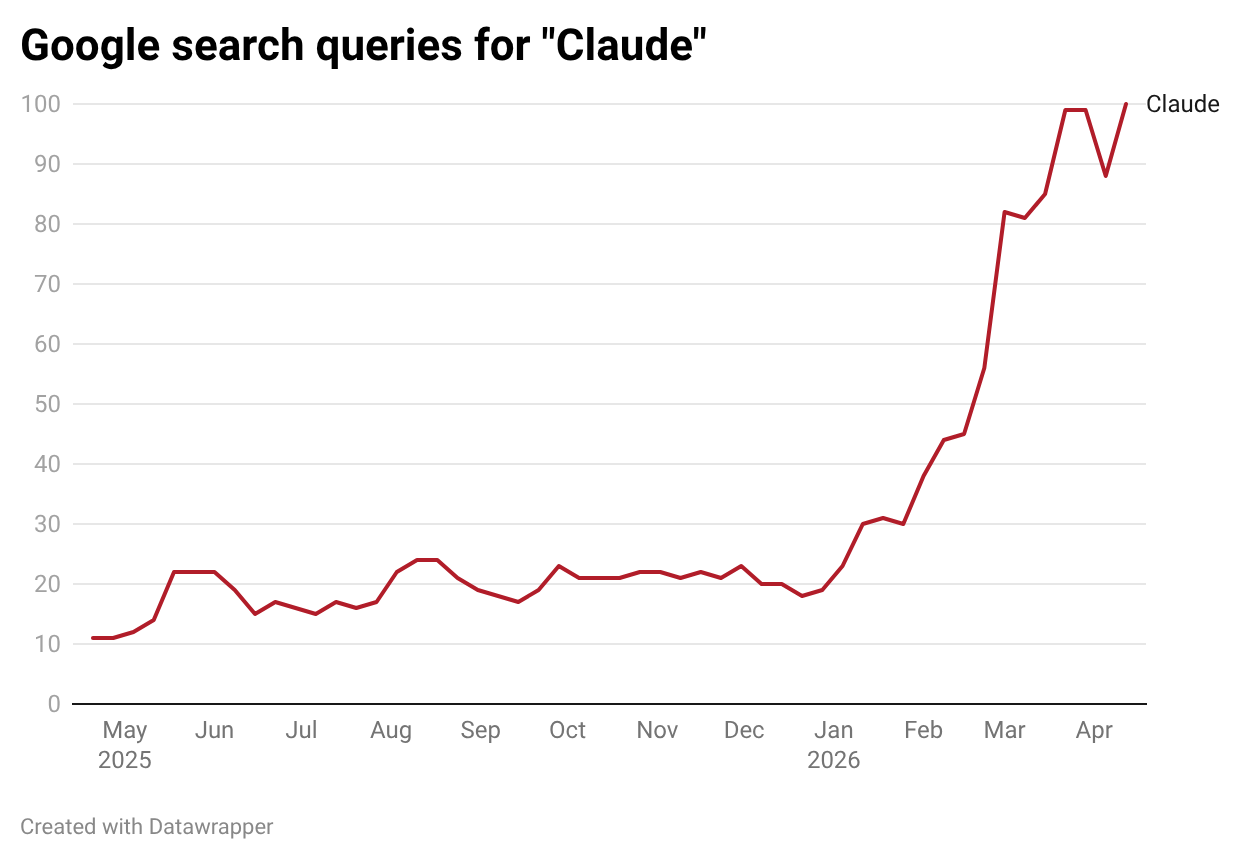
The company was founded by a group of ex-OpenAI executives, who purportedly set out to create a more ethical generative AI tool. The result was Claude.ai – a chatbot that functions much the same way as ChatGPT and Google Gemini.
However, the popularity of Claude did not take off until late January 2026. At the time, Anthropic released Claude Cowork — an AI colleague that can work with files on your computer using natural language prompts.
And since then, Anthropic has been on an epic run of product releases, including Claude Design, Claude Marketplace, Claude for Excel, Claude for PowerPoint, Claude for Word, Claude for Chrome, and Claude Mythos.
In this post, I’ll explain exactly how I use Claude to analyze stocks. And hopefully, you’ll learn something in the process.
Personalized instructions
First, go to claude.ai and create an account.
There’s a free plan that gives you access to the basic model (Claude Sonnet) with up to 100 messages per day.
There’s also a Pro plan for US$20/month that gives you access to the reasoning model Opus 4.7, with 5x more usage than the free tier, access to Claude for Microsoft Office, and Claude Cowork. I suggest buying the Pro plan.
When you first go to the website, Claude won’t know much about you. So I suggest going to your profile (in my case, “MF”) and then “Settings”. You’ll now be able to provide context on what you’re looking for from Claude.
In my case, I tell Claude that:
“I am Michael Fritzell, an equity research analyst. Whenever I ask about a particular company, I want to understand the fundamentals of the business model – in other words, how it makes money. I also want to understand what makes the company unique in comparison to its competitors. Be brief and to the point.”
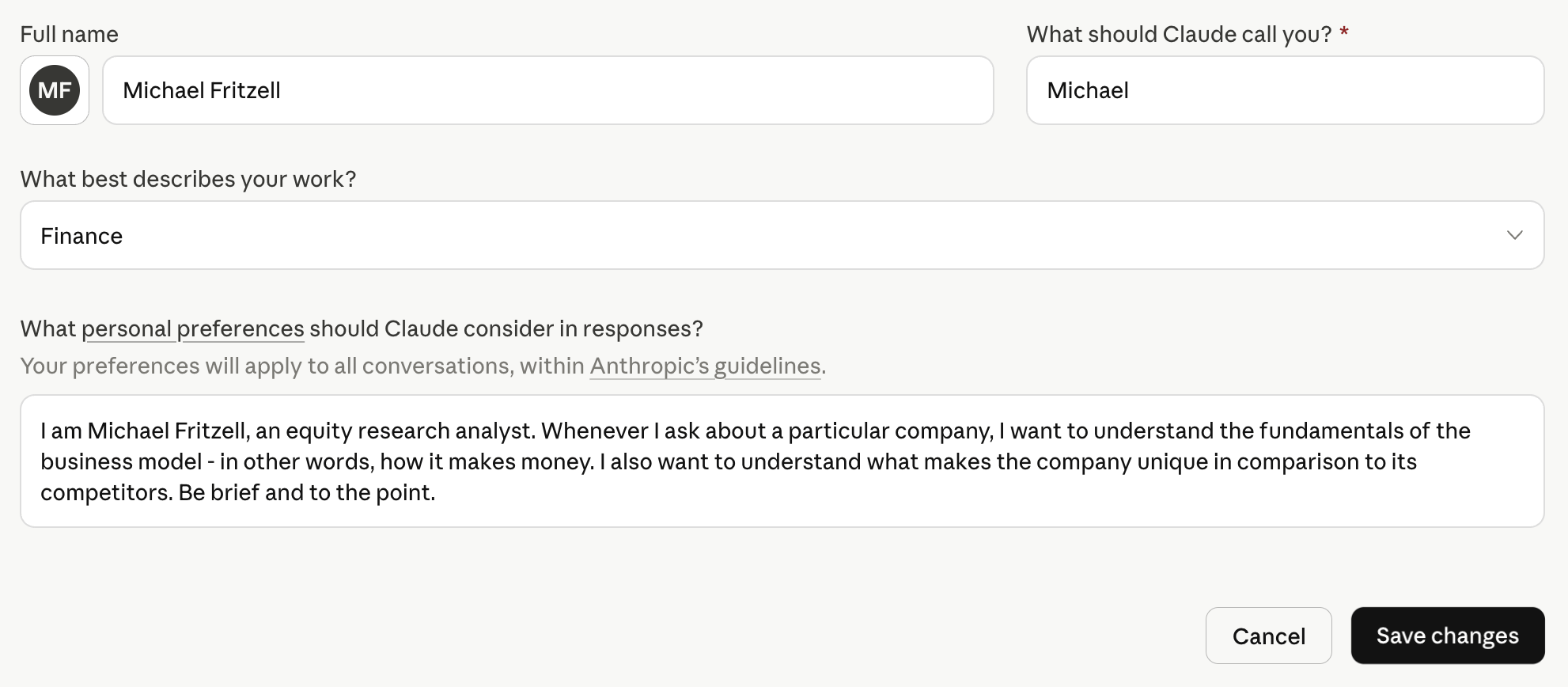
If you’ve used Claude for a while, it will have saved a memory of past discussions. You can access that memory by clicking “Memory from your chats”:
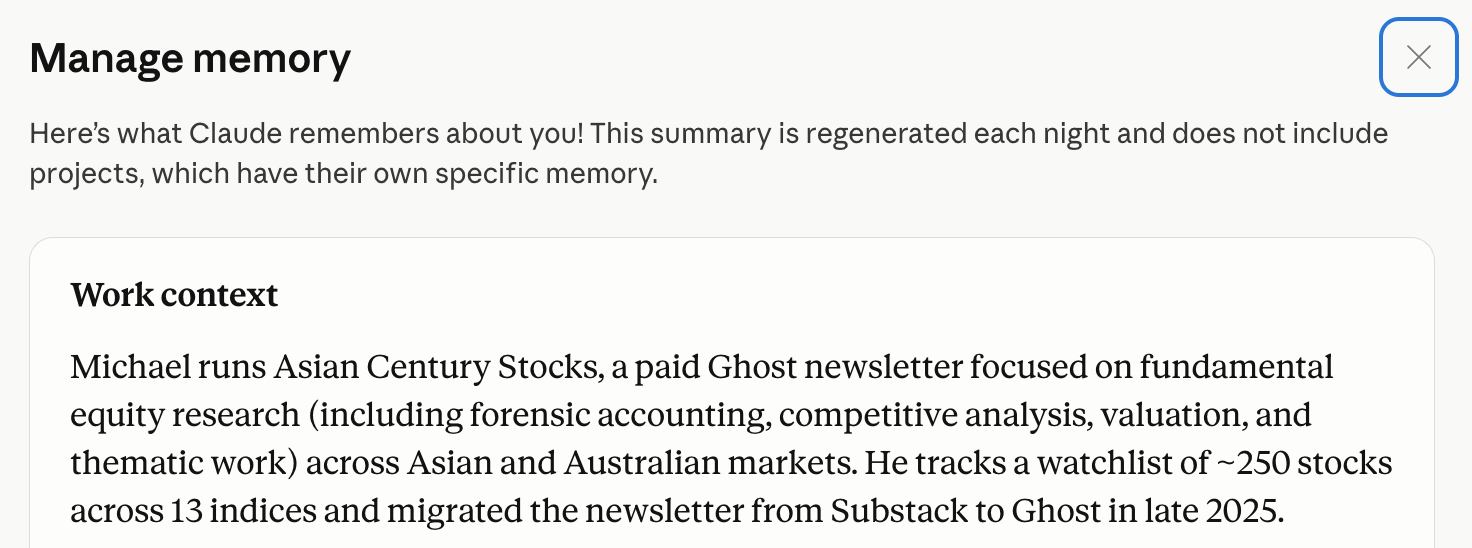
If you want to add anything to the memory, click the pen button at the lower-left corner of the screen and add things you’ll want Claude to keep in mind.
You can also import the memory from other generative AI tools. Just click “Settings” and then “Capabilities”, and follow the instructions after clicking “Start Import”.

Claude will now have much greater context on who you are and what you’re looking for.
Managing the main prompt window
While visiting the website, you can reach Claude’s main prompt window by clicking “Ctrl/⌘ + Shift + O”. You’ll then be presented with the following window:
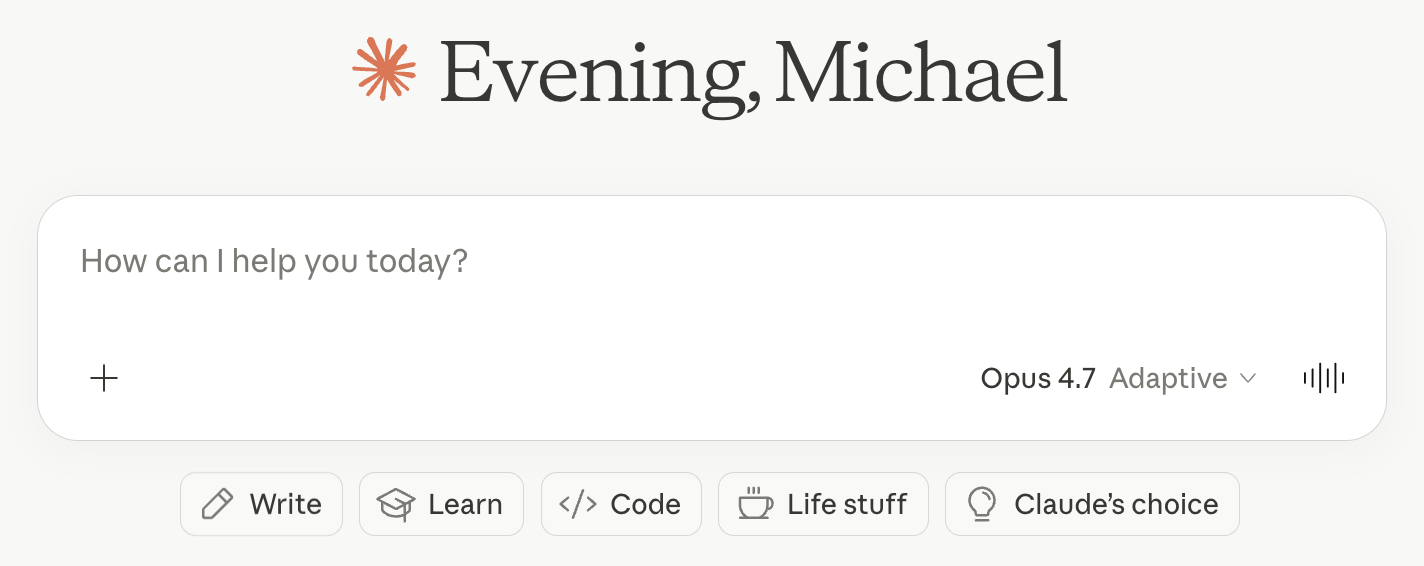
To add files, click the “+” sign, type “/” or drag and drop a file from your computer. If it’s a picture, you can also just paste it by typing “Ctrl/⌘ + V”.
Use Sonnet 4.6 for routine questions and tasks and Opus 4.7 for complex, multi-step analysis (if you’re on the Pro plan).
If you click the sound button in the lower-right corner of the screen, you’ll get to Claude’s voice mode, where you can talk to the AI model using your computer’s microphone. I’ve found Claude’s live mode better than Gemini’s but worse than ChatGPT’s. See what you think.
Save AI prompts in Claude Projects
In the past three years, I’ve been saving my AI prompts in Apple’s Notes app. This has forced me to copy the prompt text each time and then manually paste it into the prompt window.
This is obviously a poor use of time. These days, I’ve instead automated the process by switching to Claude’s Projects feature. You can think of it like a workspace for particular tasks.
The way I use Claude Projects is to save generative AI prompts, such as the following ones:
Company overview
Explain the company’s business model in simple terms. What are its key products and services? Who are its main customers, suppliers, and competitors? What are the contracts and key payment terms?
Bull vs bear
“Act as an institutional-grade equity analyst. Perform a deep-dive, adversarial analysis of the company. Start with the bull case (competitive advantages, moat sustainability, growth levers including secular tailwinds or potential earnings surprises, capital allocation). Then the bear case (2-3 risks that could permanently impair the business, potential margin compression or revenue deceleration, high expectations). Perform a pre-mortem. Consider whether current valuation multiples are too high. Finally, generate a contrarian view of what the market is currently refusing to see.”
Competitive advantages
I want to understand the strength of the company’s products and business. How do the products compare with competitors’ in terms of perceived value, branding, marketing, etc.? What competitive advantages does the company have that will protect it from future competition, so-called economic moats? And what is the company’s bargaining power over other stakeholders?
Supply chain
Explain the supply chain that the company operates in and where the company sits within it. I want the output to be a map from upstream inputs all the way to the end customer, with all stakeholders accounted for. Make sure to capture the names of all the companies interacting with the company.
Segments
Give me a breakdown of revenue, EBITDA, and earnings by segment. Describe how each of these numbers has changed over time and why. Discuss both product segments and geographical segments.
Earnings result
Analyze the company’s latest earnings result. Revenue & profit vs. expectations. Did the company beat or miss consensus? By how much? Key segment drivers. Which business lines drove the result? Any notable acceleration or deceleration? Margin trends. What happened to gross/operating margins and why? Guidance & outlook. What did management guide for next quarter/full year? Any change in tone? Balance sheet flags. Anything notable in cash flow, inventory, receivables, or debt? Market reaction. How did the stock react and what does that signal about what was priced in? Flag anything that looks unusual relative to the company’s recent history.
Earnings calls
Create a summary of the company’s recent earnings calls and tell me what management is focused on. Perform sentiment analysis and describe how sentiment has shifted over time.
Management
For the company, give me a brief assessment of the CEO and key executives: 1) Track record: What have they actually built, turned around, or delivered in prior roles? Quantify where possible. 2) Tenure & insider ownership — How long in the role, and how much skin in the game? 3) Capital allocation history — Do they reinvest wisely, acquire disciplined, or destroy value? ROE/ROIC trend under their watch. 4) Red flags — Related-party transactions, excessive comp, frequent strategy pivots, or promotional behavior. 5) Founder vs. professional manager — Which archetype, and what does that imply for this stage of the business?
Stock price analysis
Help me understand historical catalysts behind the company’s stock price. What news or events moved the stock up or down more than 5% in the last 5 years?
Comps
Generate a comparables table with the company and its key global peers within the industry. Include the Bloomberg ticker, USD market cap, and the following valuation multiples: EV/Sales, EV/EBIT, P/E, and dividend yield. Also include the 5-year average return on equity for each peer.
Forward projection
Estimate the company’s earnings per share in the following three years from 2025 to 2027. Consider industry growth, market share gains, price increases, cost pressures, operating leverage, financing costs and share count dilution in your final earnings per share estimates.
Red flags
“You are a forensic equity analyst. Identify red flags and accounting risks in the financial statements of the company, including revenue recognition, segment reporting, leases, related parties, contingencies, stock-based comp, goodwill/intangibles across the income statement, balance sheet and cash flow statement.”
Management questions
Create 15 precise questions for the CEO about the company’s long-term strategy, competitive advantages, capital allocation and risks that they see on the horizon. Order by information value.
Devil’s advocate
“You are a skeptical short-seller analyzing the company. Your job is to dismantle the bull case. What could structurally break the way this company makes money? Where is the revenue concentrated, and what happens if that concentration shifts? Why might the moat be weaker than bulls think? Who is the most dangerous competitor that bulls are underestimating, and why?What are the worst ways management has allocated capital? Any related-party transactions, aggressive accounting, or misaligned incentives? What assumptions need to hold for the current price to be justified? What happens to the valuation if growth disappoints by 20-30%? What is the single scenario that would permanently impair this business, and how plausible is it?”
Create a separate Project for each of these prompts. Then click “Set project instructions” for each of them. Tell it to use each of the above prompts.
For example, for the “Company overview” prompt above, I input the following and then click “Save instructions”.
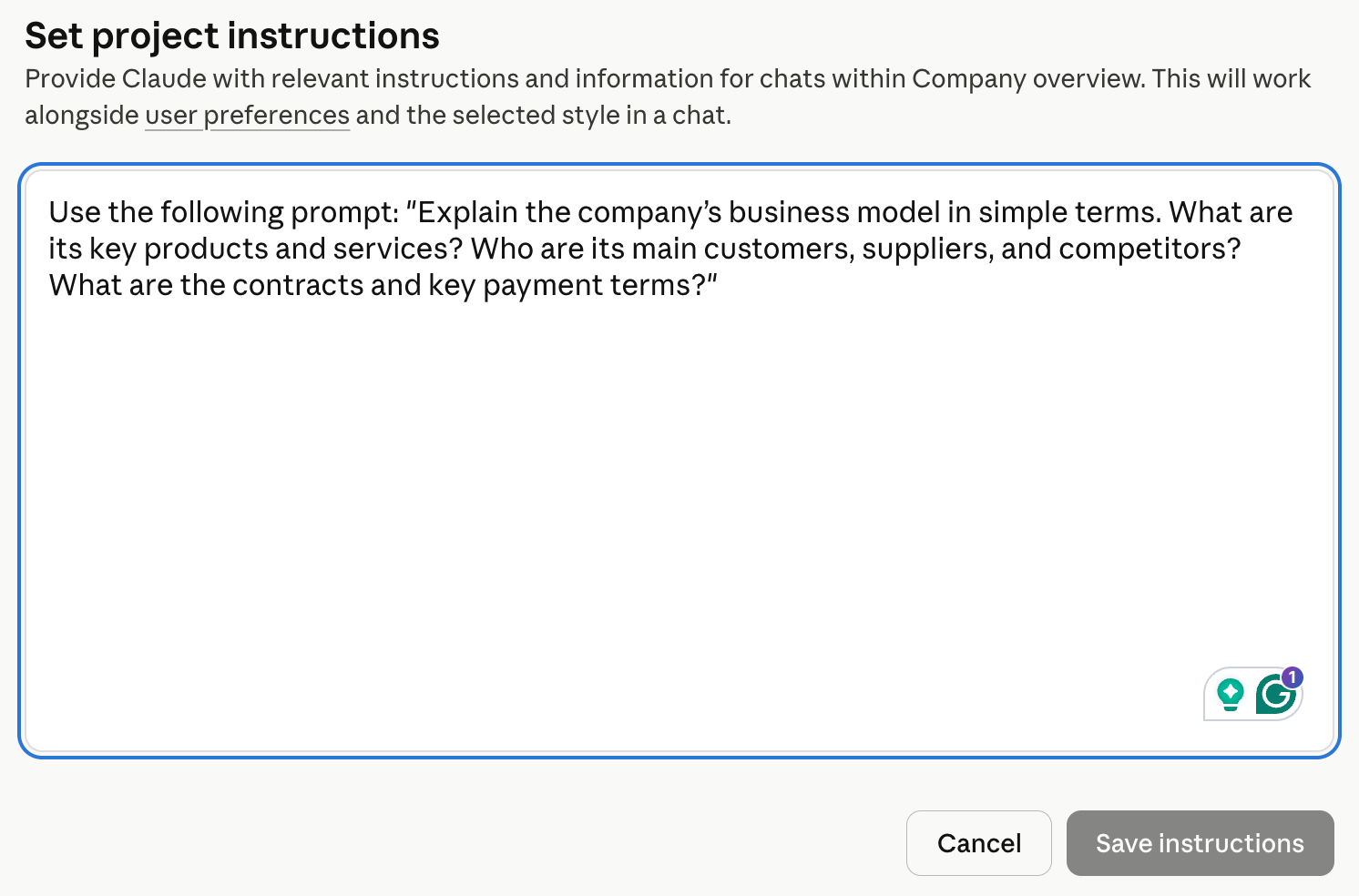
What this does is allow us to analyze a stock without having to enter the entire prompt. Instead, I just click the Project name “Company overview”, enter the ticker and then press Enter:
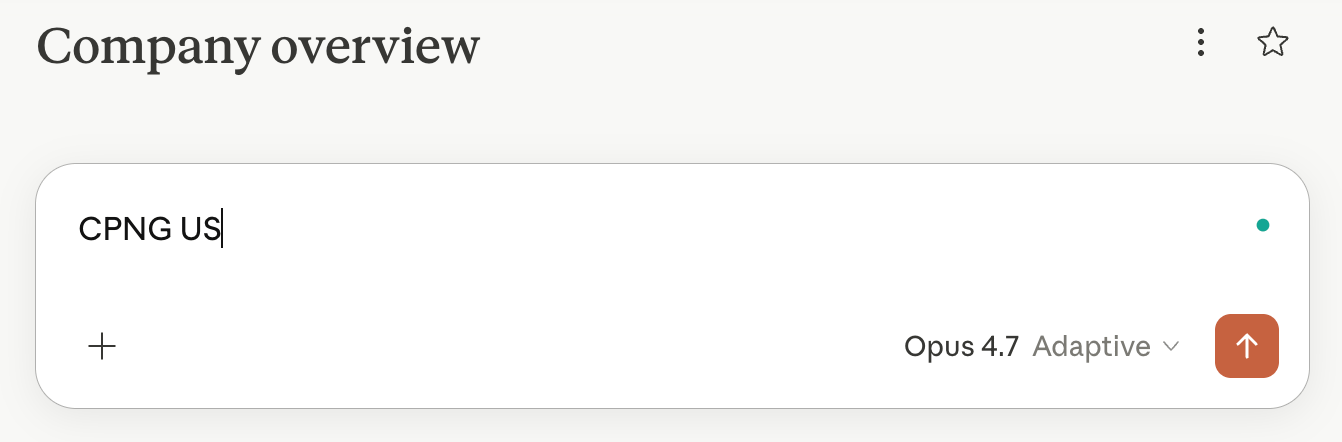
I then get an excellent reply with minimal effort:
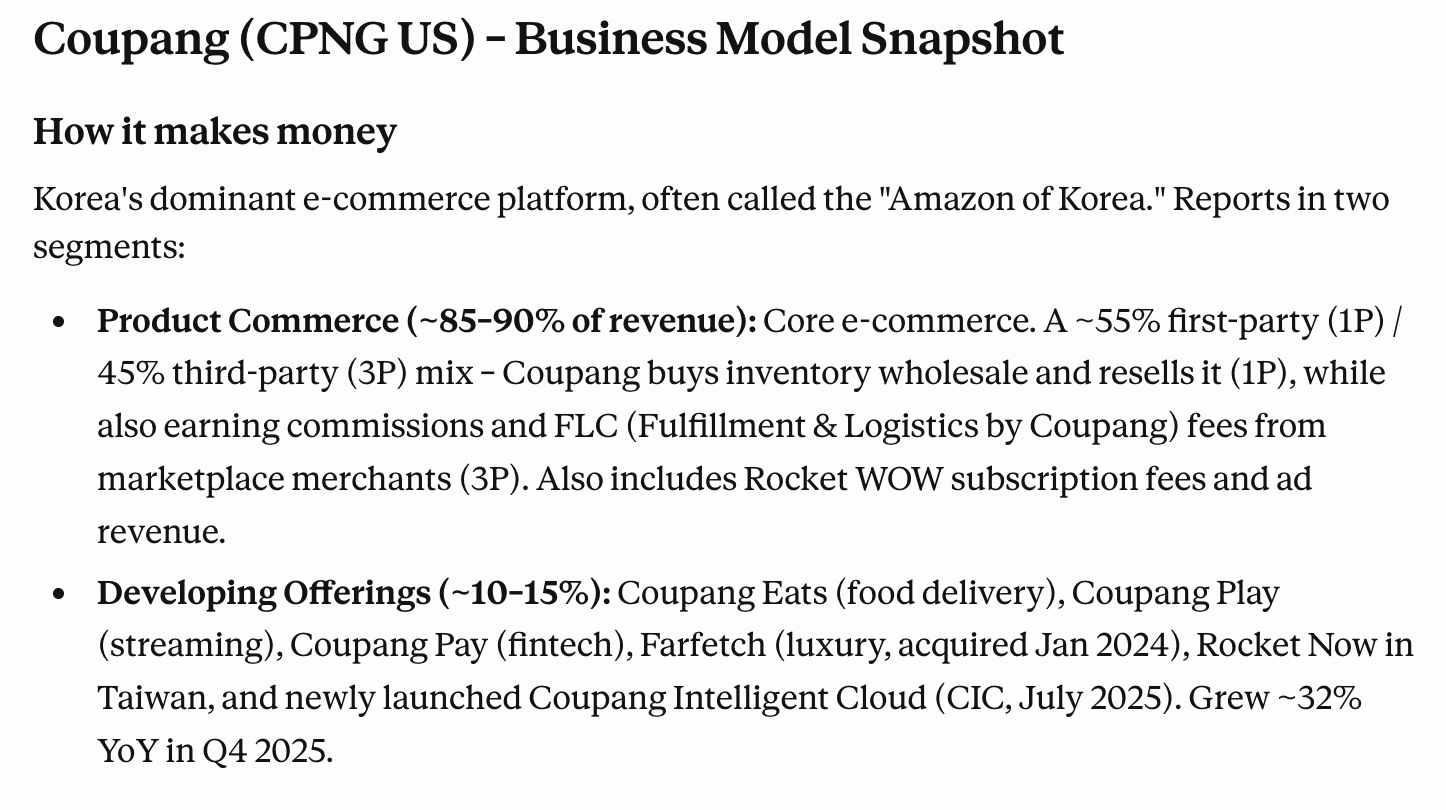
If you don’t like the reply from any of the prompts, just go to its Project and adjust it accordingly.
To streamline the process even more, click the Star sign for each of these Projects. They’ll now appear in the sidebar on the left side of your window.
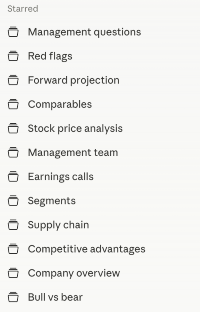
Any time you want to perform analysis, just click each Project, then type in the ticker.
Some investors use Claude Projects the same way you might use NotebookLM: to save files for particular stocks, including annual reports, earnings call transcripts, etc. But I prefer NotebookLM when it comes to analyzing a large number of documents. NotebookLM has a richer feature set. For example, it can generate podcasts, connect to YouTube and Gmail, and easily handle hundreds of sources.
Claude for Word/Excel/PowerPoint
Now let’s install Claude for Word/Excel/PowerPoint.
Go to Microsoft’s Marketplace, click “Get it now” for the app plug-ins you want, then follow the installation and login process.
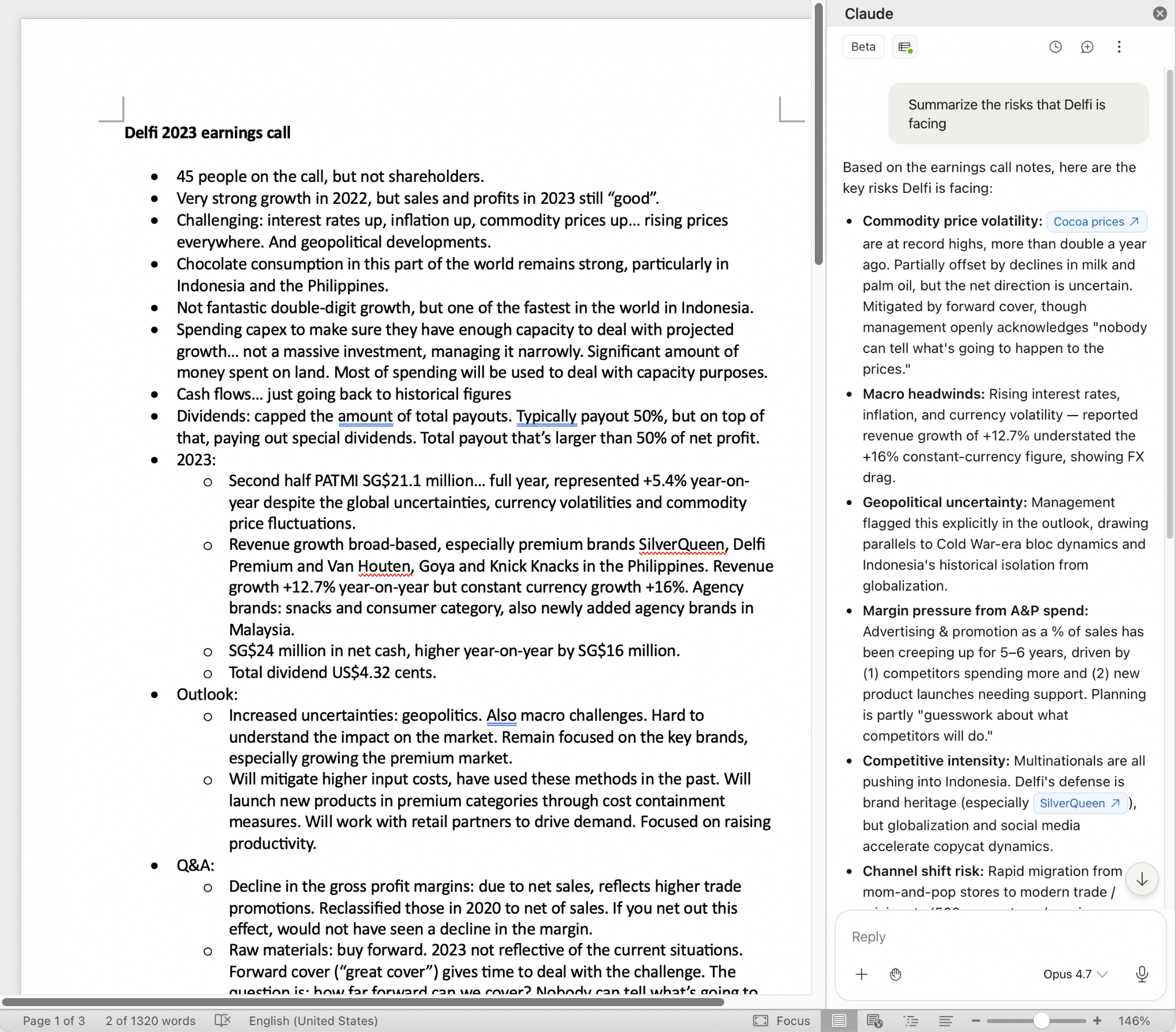
Next time you open any of these apps, you can ask Claude to analyze or modify the file directly from the associated chat window. For example, you can open the Word file with notes from a previous conference call, and ask for the greatest risks mentioned by management in the call:
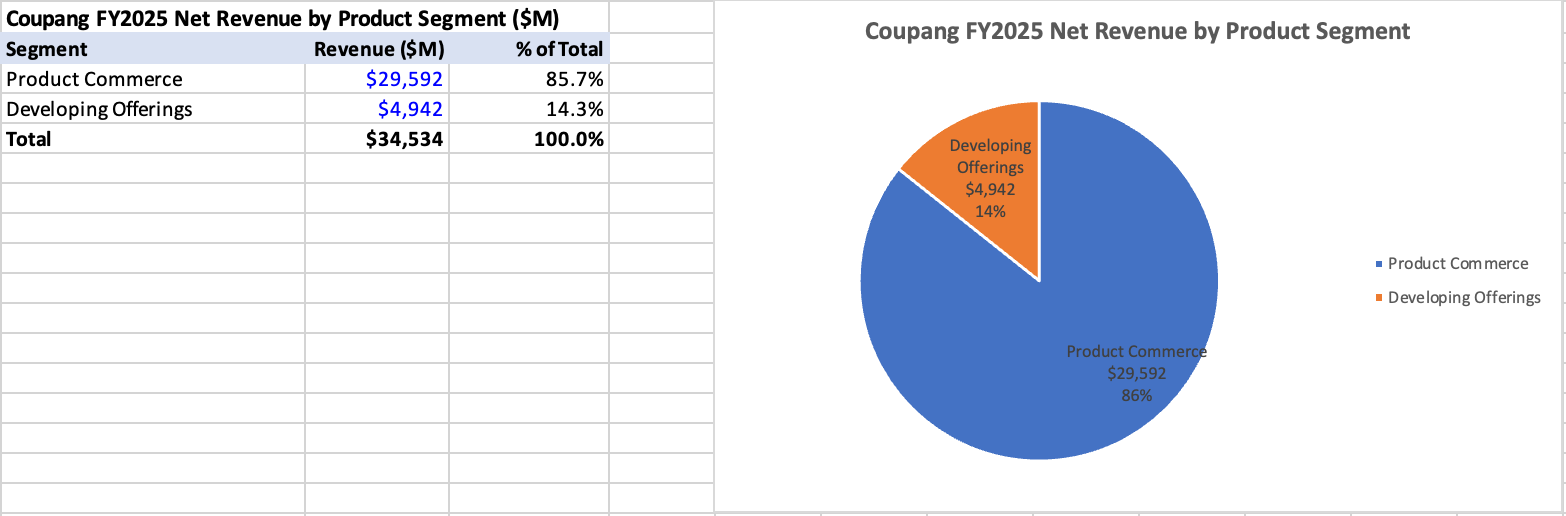
Another example from my personal workflow is to open Microsoft Excel, drag and drop Coupang’s 4Q2025 earnings presentation into the Claude sidebar and perform a segment analysis:
“Find 2025 revenues by product segment and geographical segment and summarize them in pie charts”
You’re then presented with the following output:
Other use cases include checking an Excel sheet for formula mistakes, summarizing long documents, and checking for factual or spelling mistakes in my Asian Century Stocks PowerPoint presentations.
Claude Cowork for automating tasks
Next, we’ll download Claude’s desktop app. It’s only available for MacOS right now, but it will probably be available on Windows soon.

Inside the app, there are three modes to choose from
Claude Chat
Claude Code
Claude Cowork
In short, Chat is for thinking through problems. Code is for building software. And Cowork for running tasks on your computer.
Once you’ve installed the Claude desktop app and have it running in the background, you can access it anytime by double-clicking the Options key on your Mac. You’ll then be presented with the following pop-up window:

In my view, this is the fastest way to get an answer to a question, much faster than opening your web browser and searching on Google.
I also have the Caps Lock button connected to Claude’s voice mode. If you click Caps Lock at any time, the voice mode will be activated, and you can simply speak into your microphone to get an answer:

But let’s dig into Claude Cowork specifically. You can find the Cowork button at the top-left corner of the Claude desktop app:

Every time you deal with Cowork, you’ll want to give it access to a folder on your computer. Just click the “Work in a project” button and then click “Choose a different folder”
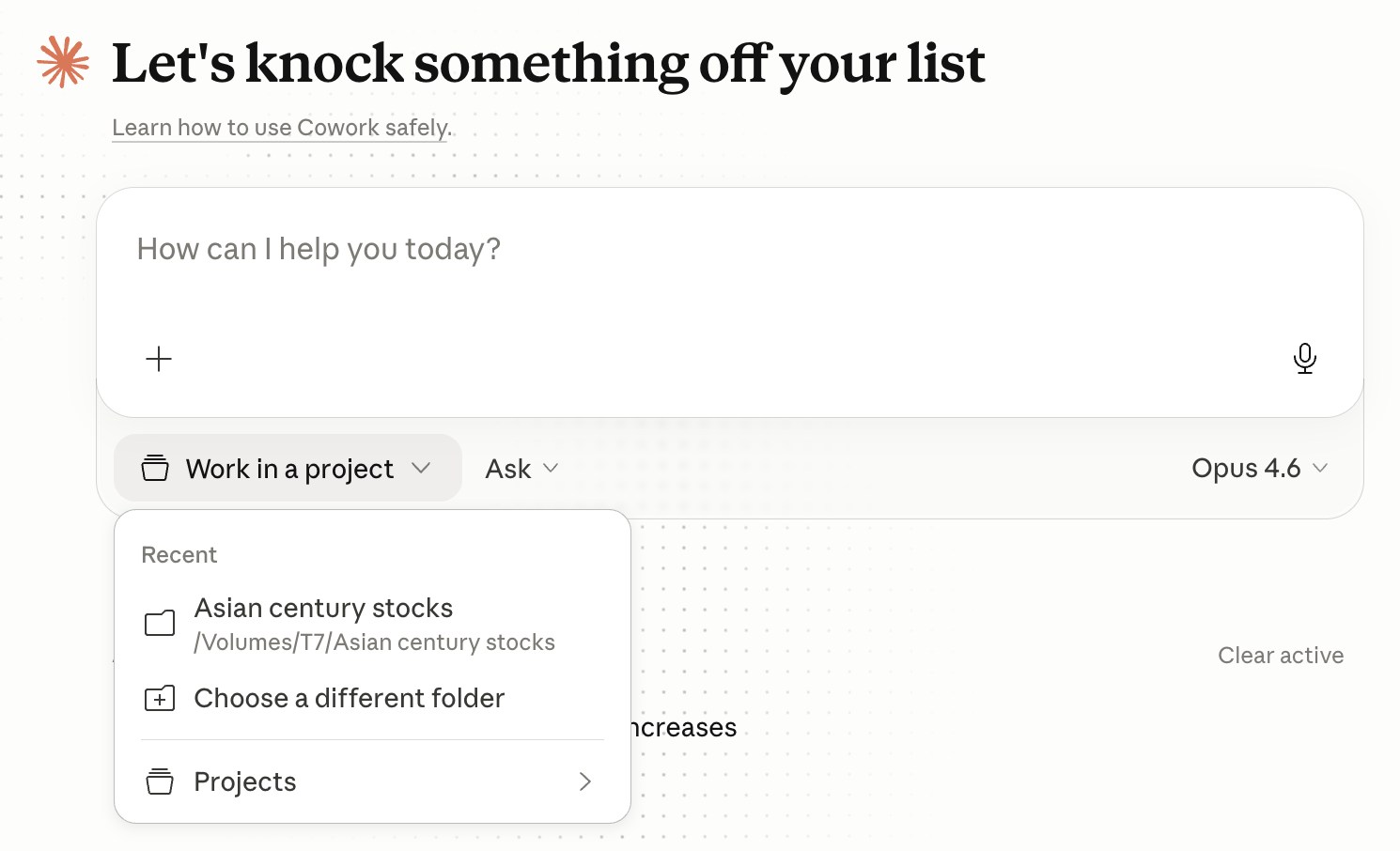
With that file access, Claude Cowork can now view, create and modify files. You should allow the app to modify files in the folder, but don’t grant it access to your entire hard drive.
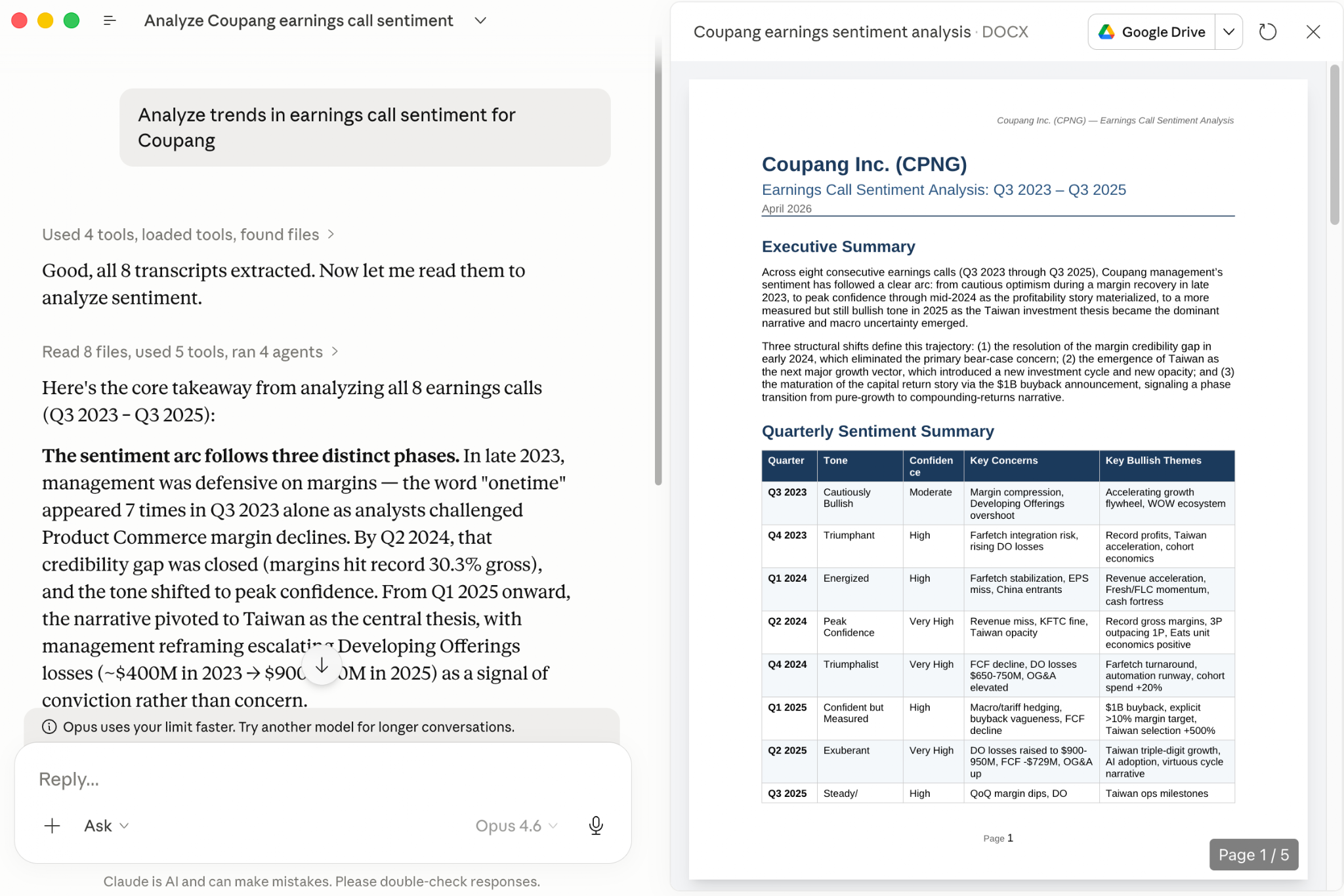
Here’s an example of how I might use Cowork. Yesterday, I downloaded the latest eight earnings call transcripts for the Korean e-commerce company Coupang into a folder, and then asked it to analyze the recent trend in its earnings call sentiment. It then gives me the following output, which is saved in a separate Microsoft Word document called “Coupang earnings sentiment analysis.docx”:
If you click “Instructions”, you can tell Cowork exactly how you’ll want the output for any particular task to look. These instructions will be saved in a separate file called “Claude.md” in your chosen folder.
Other than earnings call sentiment analysis, I might use Cowork for finding obscure data, translation tasks, summarizing documents, conducting forensic analysis on financial statements, etc.
But, in my view, where Claude Cowork really shines is where you need to create or modify existing files. In the Coupang folder mentioned earlier, I have an Excel file called Coupang.xlsx as well as its recent annual reports. Knowing this, I can ask Cowork to take Coupang’s income statement and insert it into a new Excel sheet:
“Create a new sheet in Coupang.xlsx where you paste the last 3 years of Coupang’s income statement from its annual reports into a nicely formatted table”
This is what I’m then presented with, inside my Coupang.xlsx Excel file:
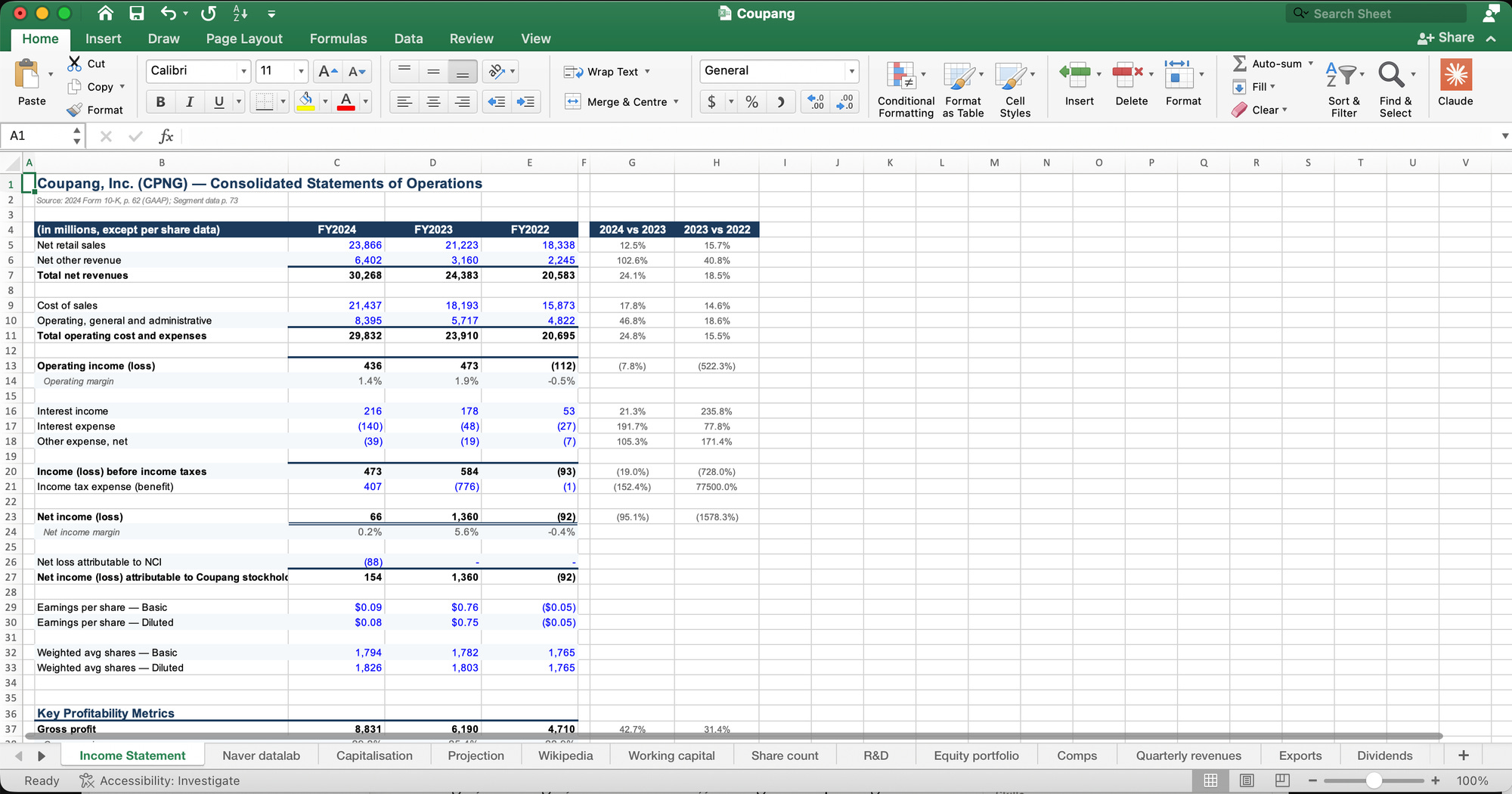
Pretty impressive. Just be aware that generative AI tools sometimes make mistakes. So always double-check the output.
You can also connect Claude Cowork with other apps. To do so, click “Customize” in the sidebar on the left-hand side of the app and then click “Connect your apps”. I suggest adding Google Calendar, Google Drive (which includes Google Sheets), Slack and Notion.
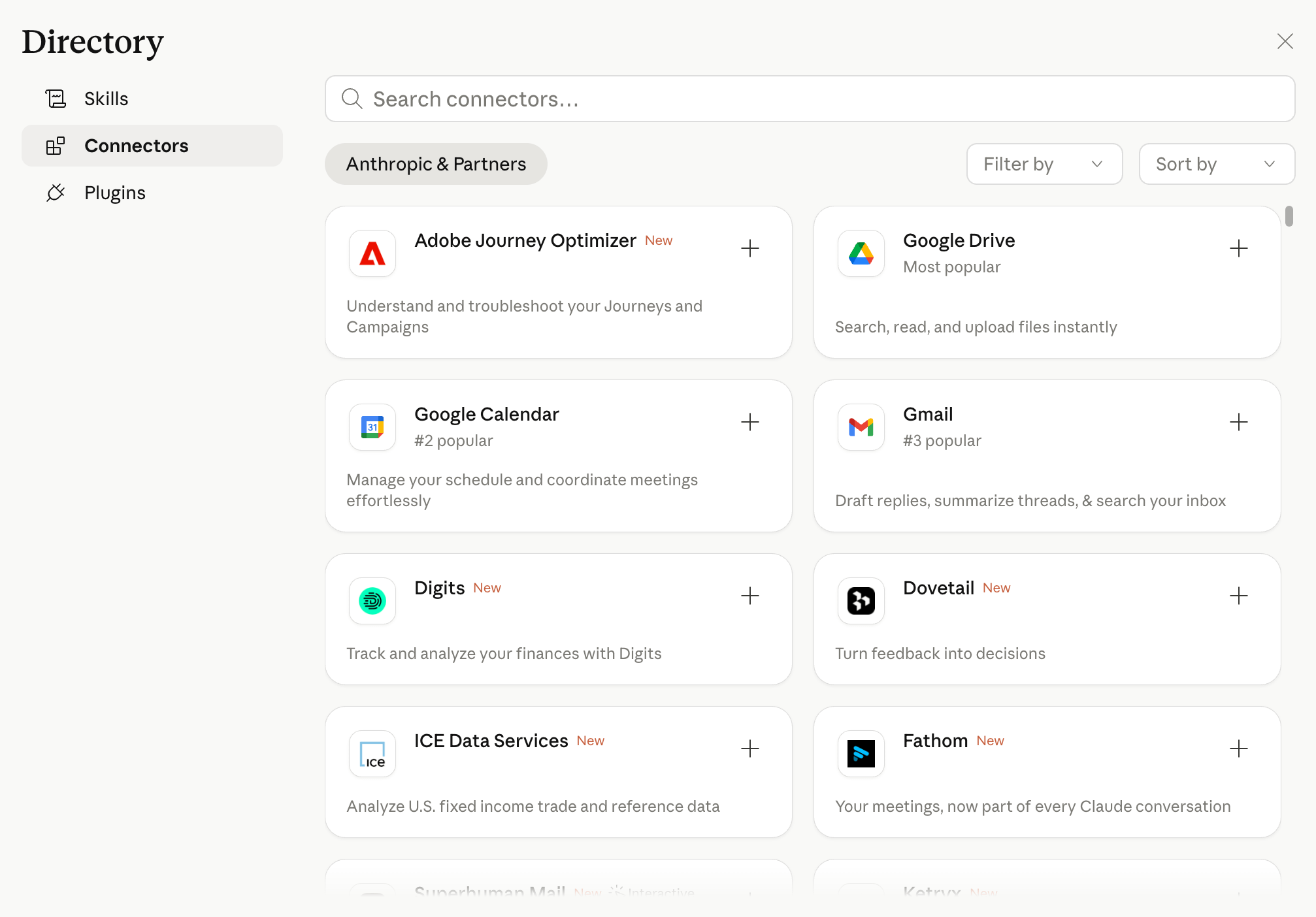
You’ll also want to search for “Control Chrome” and install that connector. On top of installing the Claude extension inside Google Chrome. By doing this, you’ll allow Claude Cowork to browse the web for you to download documents, scrape data off websites, etc.
With connections, you can automate processes using each of these apps. For example, I have a 400-line watchlist in Google Sheets that I track weekly. To automate that process, I enter the following prompt:
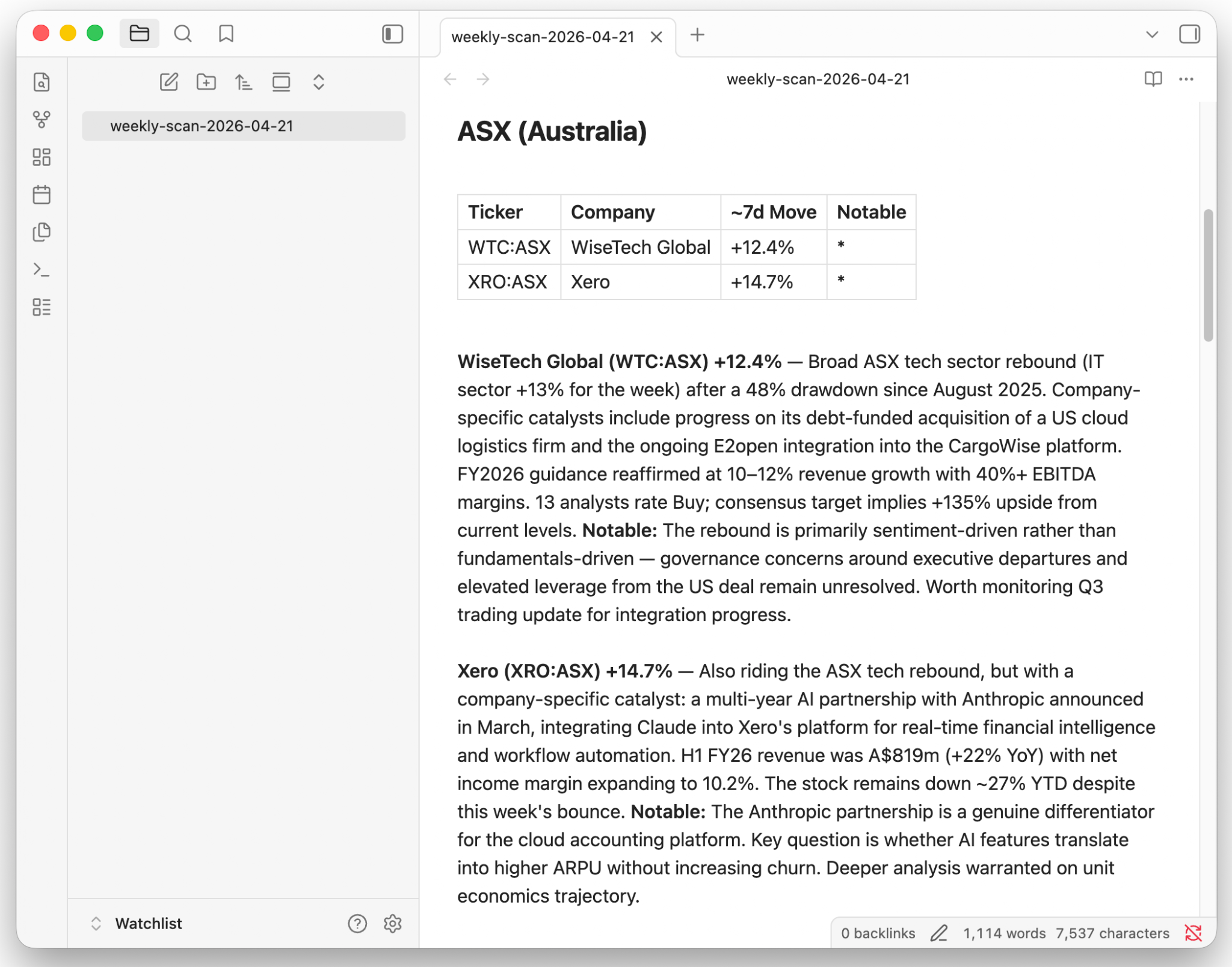
“Read my watchlist from the Google Sheet “Asian Century Stocks Watchlist”. Find the stocks that have moved more than 10% in the last 7 days. For those stocks, scan the Internet for earnings results, guidance changes, regulatory actions, analyst upgrades/downgrades, and material corporate events. Summarize the findings in a markdown report grouped by market (ASX, HKEX, SET, PSE, etc.), with a one-line summary per stock and a ‘Notable’ flag for anything that warrants deeper analysis. Skip stocks with no material news. Save the report as weekly-scan-[date].md to /Documents/Watchlist/.”
Claude Cowork then saves a file on my computer called “weekly-scan-2026-04-21.md”, containing the following information:
What the text file looks like in a typical note-taking app (in this case, Obsidian)
Since I will want to run this task periodically, I save the routine in what Claude calls a “skill”, so that Claude knows what to do each time:
“Create a skill from this workflow called /weekly-watchlist-scan that captures the process, format, and output location we just refined.”
Finally, I schedule the task to be repeated on each Monday morning at 9:00am by typing “/schedule the weekly watchlist scan every Monday morning at 9:00am SGT”.
As long as the computer is turned on and Claude Cowork is open, it’ll perform the task and save each week’s output as another “weekly-scan” file in my Watchlist folder.
Claude Dispatch
Next, we’ll learn how to control your computer using your phone.
Open the Claude Desktop app, click Cowork and then “Dispatch” in the sidebar to your left:
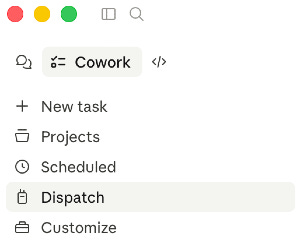
With Dispatch, you’ll be able to control your computer using the Claude app on your phone, as well as all the apps that are connected to it:
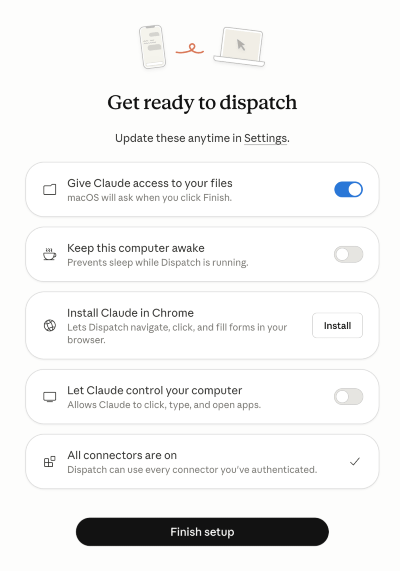
Every time you want to control your computer, just open the Claude app on your phone and click “Dispatch” to open the window where you give instructions to your computer.
When I’m on the run, I might want to retrieve a document from my computer. So I asked Dispatch to retrieve the Coupang earnings sentiment analysis document that I just created:
“Retrieve the Coupang Earnings Sentiment Analysis saved in my Coupang folder”
I’m then presented with the following output within Dispatch:
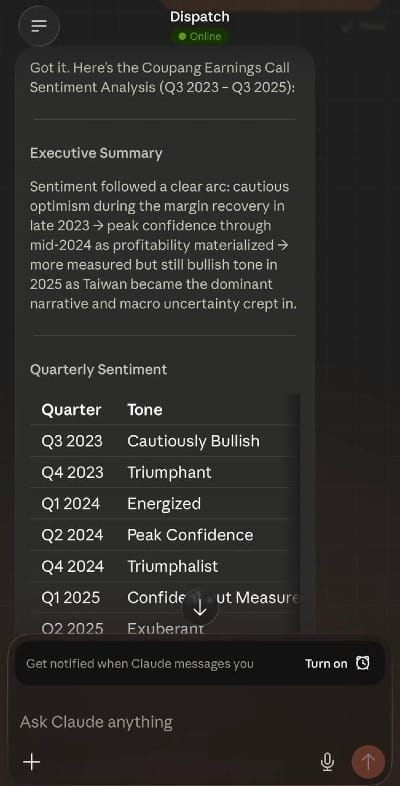
So it’s very useful, as you can see. With Dispatch, you can work remotely from just your phone using natural language.
Conclusion
Claude isn’t perfect. It’s a little slow at times, and if you’re a heavy user, you’ll quickly exceed your usage quota. Many of us will feel compelled to upgrade to the US$100/month plan.
But I think the Google Chrome plug-in, Microsoft Office plug-ins, Cowork, Dispatch and the other Claude tools will fundamentally change the way we operate. It’s time for us to learn these tools to automate some of our daily work.
In practice, organizing my most-used prompts through Claude Projects might be the one trick that has saved me the most time. Today, when I’m interested in a company, I just click each Project, enter the ticker and voila — I get exactly the output I want.
I’ve also found it helpful to throw a document into Claude for Excel and have it present the data in a nicely formatted table in a spreadsheet.
I still haven’t used Cowork much, as I prefer working with files in the cloud. But I can see why others find it helpful.
Now that I’ve gone through my usage habits, I’m interested in hearing how you’re finding Claude. What tricks are you using to automate your research process?
Michael

This was an article from investment newsletter Asian Century Stocks. Sign up for free here.
A few months ago the celebrated Creator and media analyst interviewed Michael you can catch it here:
Thanks for reading! And I hope you learned something new.
Visit the Full Library of Asia Century Stocks.